FileHandle
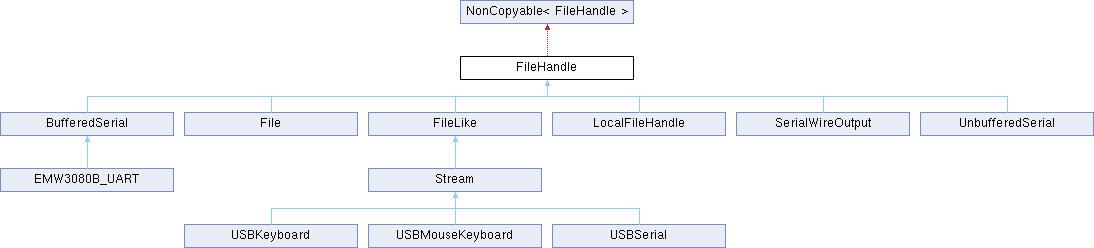
FileHandle is an abstract class representing an entity that supports file-like operations, such as read and write. This may be an actual File on a storage device provided by a FileSystem, or a communications device such as a serial port.
The FileHandle abstraction represents an already-opened file or device, so it has no open method of its own - the opening may take the form of a call to another class that returns a FileHandle, such as FileSystem::open, or it may be implicit in the construction of an object such as BufferedSerial.
Info
The FileHandle abstraction permits stream-handling code to be device-independent, rather than tied to a specific device like a serial port. Examples of such code in Mbed OS are:
- The console input and output streams (
stdinandstdout). - The
ATCmdParserhelper. - The PPP connection to lwIP.
Exactly which operations a FileHandle supports depends on the underlying device, and this in turn restricts what applications it is suitable for. For example, a database application might require random-access and seek, but this may not be available on a limited file system, and certainly not on a stream device. Only a File on a full FileSystem, such as FATFileSystem, would generally implement the entire API. Specialized devices may have particular limitations or behavior, which limit their general utility. Devices that do not implement a particular call indicate it by an error return - often ENOSYS, but sometimes more specific errors, such as ESPIPE apply; please see the POSIX specifications for details.
Relationship of FileHandle to other APIs
You can use a FileHandle directly, or you can use it through standard C-language APIs for file access. These APIs come in two flavors: the ones defined by POSIX, such as read(), which accept a file descriptor, and the ones defined by the C standard, such as fread(), which accept a struct FILE * (also referred to as a "stream"). Internally, Mbed OS provides abstractions allowing a file descriptor or a struct FILE * to be opened for any FileHandle object.
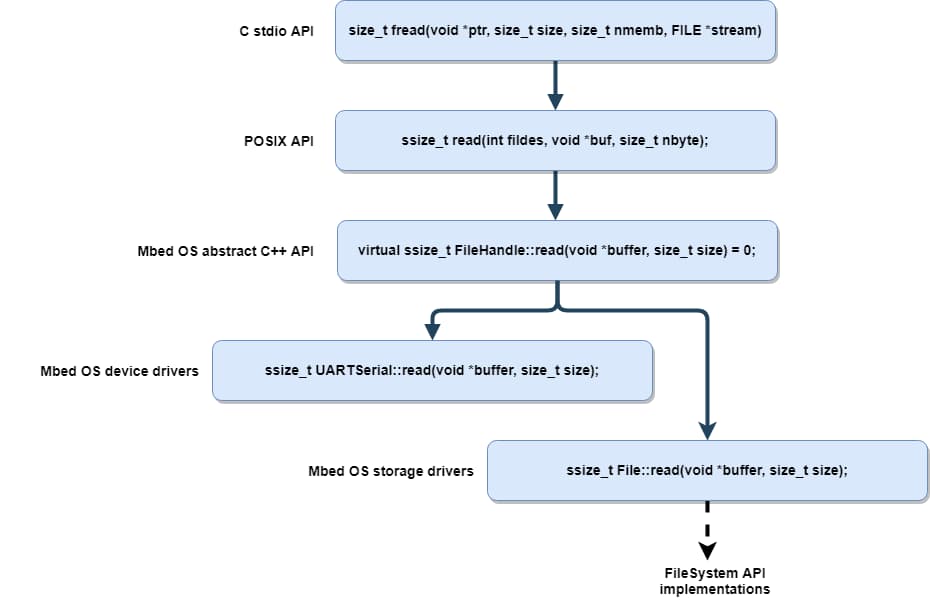
*note that the above diagram refers to BufferedSerial using its old name, UARTSerial
The three APIs provide somewhat different feature sets:
| API | C Standard | POSIX | Mbed |
|---|---|---|---|
| Headers | stdio.h, iostream |
mbed_retarget.h |
FileHandle.h, mbed_poll.h |
| File handle type | FILE * |
int |
FileHandle object |
| Blocking I/O | Yes (always) | Yes (default) | Yes (default) |
| Nonblocking I/O | No | Yes | Yes |
| Poll | No | Yes (struct pollfd) |
Yes (struct pollfh) |
| Sigio | No | No | Yes |
| Disable input or output | No | No | Yes |
| Device-specific extensions | No | No | Possible using derived types |
| Newline conversion | Yes (enabled with JSON) | No | No |
| Error indications | EOF, ferror, set errno | Return -1, set errno | Return negative error code |
| Portability | High | Medium | Low |
You can mix the APIs if you're careful, for example setting up a callback initially with FileHandle::sigio but performing all subsequent operations using POSIX.
errno Safety
errno is not thread-local on all toolchains. This may cause problems with error handling if multiple threads are using POSIX or C file APIs simultaneously.
Mapping between APIs
Calls are provided to map between different types of file handle:
int mbed_bind_to_fd(FileHandle *): bind aFileHandleto a POSIX file descriptor.FILE *fdopen(FileHandle *fh, const char *mode): bind aFileHandleto a stdioFILE.FILE *fdopen(int fd, const char *mode): bind a POSIX file descriptor to a stdioFILE.int fileno(FILE *stream): Obtain the file descriptor for aFILEFileHandle *mbed_file_handle(int fd)obtain theFileHandlefor a POSIX file descriptor
The POSIX file descriptors for the console are available as STDIN_FILENO, STDOUT_FILENO and STDERR_FILENO, permitting operations such as fsync(STDERR_FILENO), which would for example drain the console serial port's output buffer.
Redirecting the console
If a target has serial support, by default a serial port is used for the console. The pins and settings for the port selection come from target header files and JSON settings. This uses either an internal DirectSerial if unbuffered (for backwards compatibility) or BufferedSerial if platform.stdio-buffered-serial is true.
The target can override this by providing mbed::mbed_target_override_console to specify an alternative FileHandle. For example, a target using SWO might have:
namespace mbed
{
    FileHandle *mbed_target_override_console(int)
    {
        // SerialWireOutput
        static SerialWireOutput swo;
        return &swo;
    }
}
Then any program using printf on that target sends its output over the SWO, rather than serial.
Weak Symbol Override
The above code is a weak symbol override, meaning it needs to live in a .cpp file containing other code that is linked in and used in the final application, or it will not work. So don't put it in its own cpp file!
Because targets can redirect the console in this way, portable applications should not use constructs such as Serial(CONSOLE_TX, CONSOLE_RX), assuming that this will access the console. Instead they should use stdin/stdout/stderr or STDIN_FILENO/STDOUT_FILENO/STDERR_FILENO.
    // Don't do:
    Serial serial(CONSOLE_TX, CONSOLE_RX);
    serial.printf("Hello!\r\n");

    // Do do:
    printf("Hello!\n");
Beyond the target-specific override, an application can override the target's default behavior itself by providing mbed::mbed_override_console. Below are two examples that show how you can redirect the console to a debugger using semihosting or another application-specific serial port:
namespace mbed
{
    FileHandle *mbed_override_console(int fileno)
    {
        // Semihosting allows "virtual" console access through a debugger.
        static LocalFileSystem fs("host");
        if (fileno == STDIN_FILENO) {
            static FileHandle *in_terminal;
            static int in_open_result = fs.open(&in_terminal, ":tt", O_RDONLY);
            return in_terminal;
        } else {
            static FileHandle *out_terminal;
            static int out_open_result = fs.open(&out_terminal, ":tt", O_WRONLY);
            return out_terminal;
        }
    }
}
The application can redirect the console to a different serial port if you need the default port for another use:
namespace
{
    FileHandle *mbed_override_console(int)
    {
        static BufferedSerial uart(PA_0, PA_1);
        return &uart;
    }
}
Alternatively, an application could use the standard C freopen function to redirect stdout to a named file or device while running. However there is no fdreopen analog to redirect to an unnamed device by file descriptor or FileHandle pointer.
Suppressing console output
To always suppress output, you can provide an mbed_override_console that returns a sink class that discards output. (For UART console targets, you can simply set target.console-uart to false in your mbed_app.json.)
To temporarily suppress output, mbed_override_console can return a class that acts as a switchable mux between a sink and the real output.
More portably, you could ensure all your code uses your own FILE *output_stream rather than stdout, and you could dynamically change that between stdout and fdopen(Sink). That then doesn't rely on "under C library" retargeting of stdout. Instead, you must switch streams at the application level.
Using printf and scanf with FileHandles
In older versions of Mbed that used the Stream class, it was possible to printf and scanf directly using the class. This is no longer possible with FileHandle alone, but can be done easily by using the C-level file API:
BufferedSerial mySerialPort(...);
FILE* mySerialPortFile = fdopen(&mySerialPort, "r+"); // open in read-write mode
fprintf(mySerialPortFile, "hello\n");
Polling and nonblocking
By default, FileHandles conventionally block until a read or write operation completes. This is the only behavior supported by normal Files, and is expected by the C library's stdio functions.
Device-type FileHandles, such as UARTSerial, are expected to also support nonblocking operation, which permits the read and write calls to return immediately when unable to transfer data. Please see the API reference pages of these functions for more information.
For a timed wait for data, or to monitor multiple FileHandles, see poll().
Event-driven I/O
If using nonblocking I/O, you probably want to know when to next attempt a read or write if they indicate no data is available. FileHandle::sigio lets you attach a Callback, which is called whenever the FileHandle becomes readable or writable.
Important notes on sigio:
- The sigio may be issued from interrupt context. You cannot portably issue
readorwritecalls directly from this callback, so you should queue anEventor wake a thread to perform thereadorwrite. - The sigio callback is only guaranteed when a
FileHandlebecomes readable or writable. If you do not fully drain the input or fully fill the output, no sigio may be generated. This is also important on start-up - don't wait for sigio before attempting to read or write for the first time, but only use it as a "try again" signal after seeing anEAGAINerror. - Spurious sigios are permitted - you can't assume data will be available after a sigio.
- Given all the above, use of sigio normally implies use of nonblocking mode or possibly
poll.
Ordinary files do not generate sigio callbacks because they are always readable and writable.
Suspending a device
Having a device open through a FileHandle may cost power, especially if open for input. For example, for BufferedSerial to be able to receive data, the system must not enter deep sleep, so deep sleep is prevented while the BufferedSerial is active.
To permit power saving, you can close or destroy the FileHandle, or you can indicate that you do not currently require input or output by calling FileHandle::enable_input or FileHandle::enable_output. Disabling input or output effectively suspends the device in that direction, which can permit power saving.
This is particularly useful when an application does not require console input - it can indicate this by calling mbed_file_handle(STDIN_FILENO)->enable_input(false) once at the start of the program. This permits deep sleep when platform.stdio-buffered-serial is set to true.
Stream-derived FileHandles
Stream is a legacy class that provides an abstract interface for streams similar to the FileHandle class. The difference is that the Stream API is built around the getc and putc set of functions, whereas FileHandle is built around read and write. This makes implementations simpler but limits what is possible with the API. Because of this, implementing the FileHandle API directly is suggested API for new device drivers.
Note that FileHandle implementations derived from Stream, such as Serial, have various limitations:
Streamdoes not support nonblocking I/O, poll or sigio.Streamdoes not have correctreadsemantics for a device - it always waits for the entire input buffer to fill.Streamreturns 0 fromisatty, which can slightly confuse the C library (for example defeating newline conversion and causing buffering).
As such, you can only use Stream-based devices for blocking I/O, such as through the C library, so we don't recommend use of Stream to implement a FileHandle for more general use.
FileHandle using C library example
/*
 * Copyright (c) 2006-2020 Arm Limited and affiliates.
 * SPDX-License-Identifier: Apache-2.0
 */
#include "mbed.h"

static DigitalOut led2(LED2);

// BufferedSerial derives from FileHandle
static BufferedSerial device(STDIO_UART_TX, STDIO_UART_RX);

int main()
{
    // Once set up, access through the C library
    FILE *devin = fdopen(&device, "r");

    while (1) {
        putchar(fgetc(devin));
        led2 = !led2;
    }
}
The example monitors a serial console device, and every time it reads a character, it sends it back to the console and toggles LED2.
FileHandle sigio example
/*
 * Copyright (c) 2006-2020 Arm Limited and affiliates.
 * SPDX-License-Identifier: Apache-2.0
 */
#include "mbed.h"

static DigitalOut led1(LED1);
static DigitalOut led2(LED2);

static BufferedSerial device(STDIO_UART_TX, STDIO_UART_RX);

static void callback_ex()
{
    // always read until data is exhausted - we may not get another
    // sigio otherwise
    while (1) {
        char c;
        if (device.read(&c, 1) != 1) {
            break;
        }
        putchar(c);
        putchar('\n');
        led2 = !led2;
    }
}

int main()
{
    // Ensure that device.read() returns -EAGAIN when out of data
    device.set_blocking(false);

    // sigio callback is deferred to event queue, as we cannot in general
    // perform read() calls directly from the sigio() callback.
    device.sigio(mbed_event_queue()->event(callback_ex));

    while (1) {
        led1 = !led1;
        ThisThread::sleep_for(500);
    }
}
The example monitors a serial console device, and every time it reads a character, it sends it back to the console and toggles LED2.